One learner at a glance
Where: Menu → Teach → Classes → a class → “People” or “Progress” tab → click a name
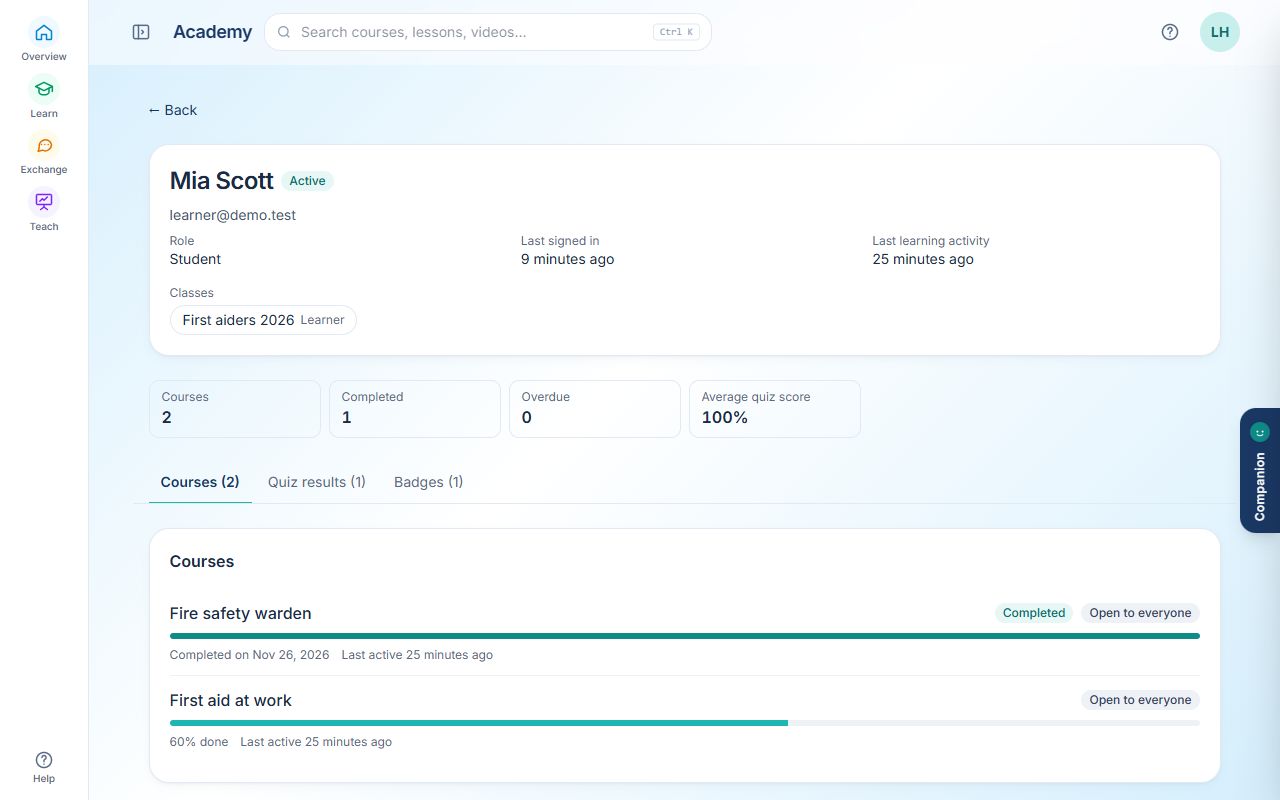
Everything about one learner on one page: their classes, courses, quiz results and badges. Only trainers and administrators can open it.
Fields and buttons
Section titled “Fields and buttons”- At the top: Name, status (Invited, Active or Deleted), e-mail address, role, when they last signed in and when they last learned. Their classes are listed below; click one to open it.
- Numbers: Under the profile: courses, completed, overdue, and the average best quiz score.
- Tabs: “Courses”, “Quiz results” and “Badges”, each with its number; one shows at a time.
- Courses: Each course with its progress bar, how far they are or when they completed it, the due date, when they were last active, and how they got the course: “Open to everyone”, “Through a class”, “Assigned personally”, “Signed up” or “Bought”. Overdue courses are marked.
- Quiz results: Each quiz they took, with its course, the number of attempts, when they last tried and their best score.
- Badges: The badges they earned, with the date. Withdrawn badges are crossed out and marked “Withdrawn”.
- Back: Returns to the page you came from.