Overview
Where: Menu → Overview
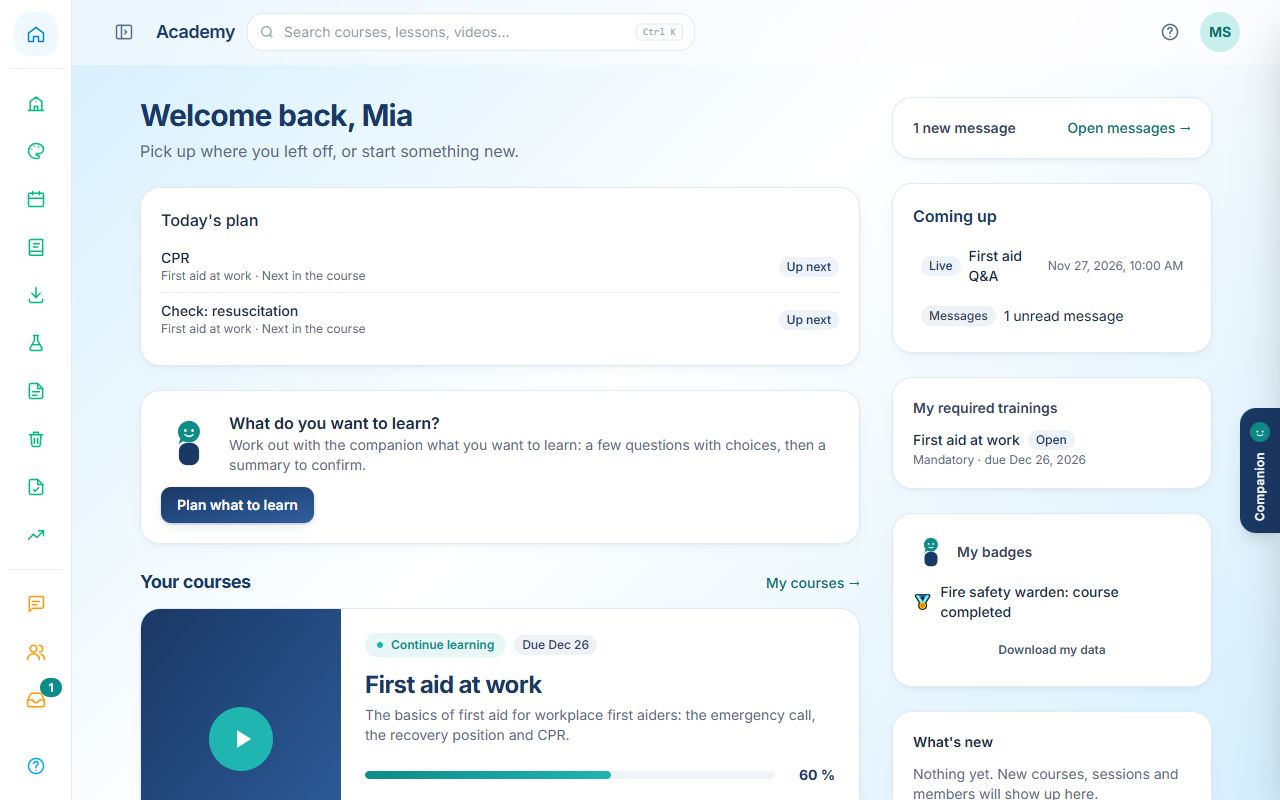
Your start page. At the top is the course you worked on last, below it your progress and every course open or assigned to you. Courses with a due date show it.
Fields and buttons
Section titled “Fields and buttons”- Continue learning: Opens the next lesson of the course you worked on last.
- Lessons completed / Courses in progress / Courses completed: Your progress at a glance.
- Start: Opens a course you haven’t started yet.
- Course list: The first five of your other courses. “Show … more” adds the next five; “My courses →” has them all.
- My badges: Finished courses earn a badge you can share.
- News for you: Your own news, shown when there is any: a trainer graded your submission or lab task (passed, not passed or returned for changes). Click an entry to open the lesson or task, where the feedback is; it then counts as read. “Mark all read” clears the bold entries.
- News: New courses, sessions and members of your organisation. The newest five show; “Show … more” adds the next ones.
- Getting started: For trainers and administrators while the academy is being set up. One folded line with how many steps are done (“… of … done”); it is open until half the steps are done. Click it to see the steps, each with “Go”. “Hide” removes it.
More on the overview
Section titled “More on the overview”-
What’s new: recent news for you, e.g. grades and answers.
-
Your feedback is asked: an evaluation waits for you; Give feedback opens it.
-
For trainers and administrators: first steps such as Create your first course, Add lessons and Schedule a live session, and Asked for, no course yet: topics people asked about without finding a course (anonymous, from 5 people on, over three months).
-
Questions about a course? Ask now opens the companion.
-
Coming up: your next live sessions, appointments and due dates.