Contracts with us
Where: Menu → Manage → Organisation → Contracts
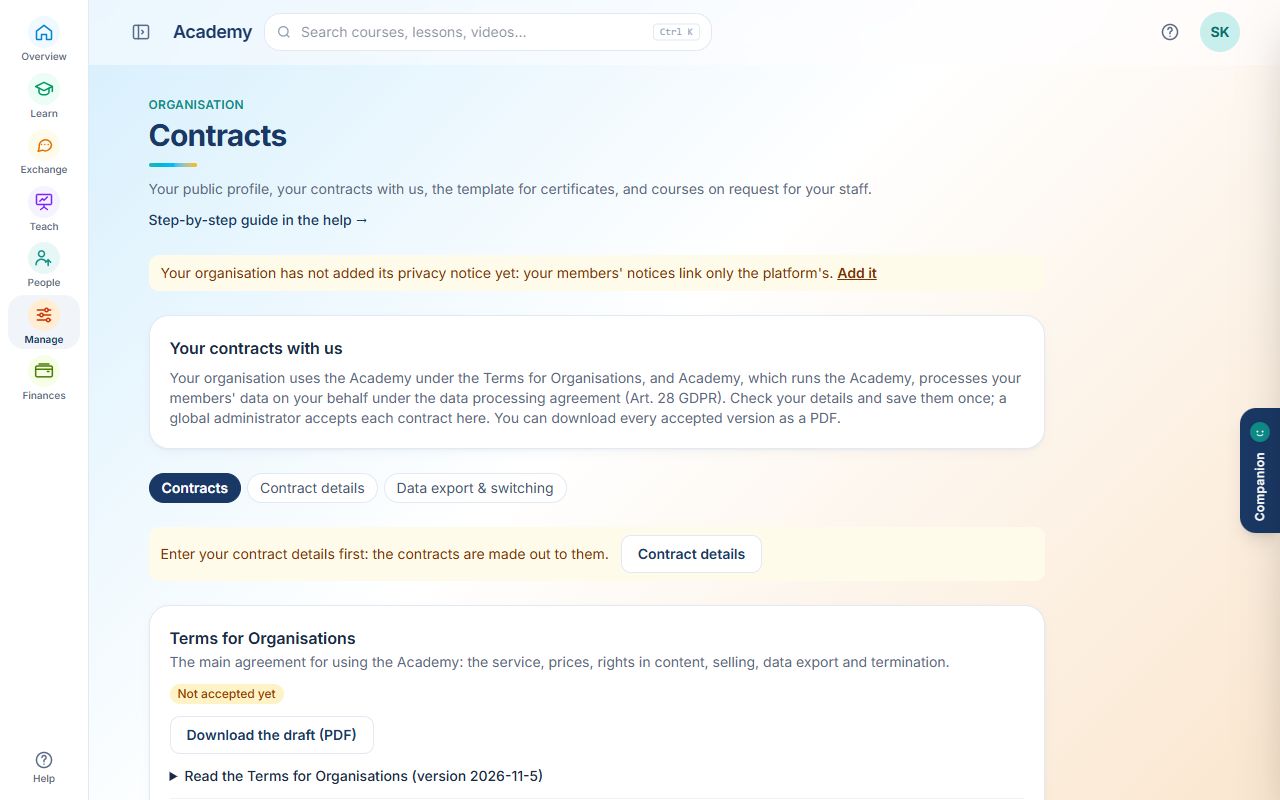
Your organisation has two contracts with the operator that runs the Academy: the Terms for Organisations, the main agreement for using the Academy, and the data processing agreement (Art. 28 GDPR), because the operator processes your members’ data on your behalf. Both are filled in with what the Academy already knows; you complete your details once and accept each contract. Every accepted version can be downloaded as a PDF. The contracts are in English; you can read them before signing up under /legal/organisations/terms and /legal/organisations/dpa.
The page has three tabs: Contracts (each contract with its state, to read, download and accept), Contract details (the details the contracts are made out to) and Data export & switching (two folded lines, “Export all data” with the latest export and “Switch to another provider” with its state). Until the details are saved, Contracts points you to them first, and Contract details shows the form in the page. Once saved, the details show as a list; “Edit details” opens them in a window.
The page’s heading is Your contracts with us. While a contract waits for you, the home page and Manage show a notice with Open the contracts.
How to
Section titled “How to”- Under Contract details, check the details: legal name, address, registration and VAT numbers come from your seller details where you entered them.
- Enter who represents your organisation and who is its contact for data protection, and its data protection officer if it has one; add further people who may give instructions if you like. Then “Save details”. Later changes: “Edit details”, then “Save details” in the window.
- Read each contract, or download its draft as a PDF.
- A global administrator confirms that the organisation is not a consumer (for the Terms), ticks that they are authorised and accepts. Download the accepted versions for your records.
Contract details, field by field
Section titled “Contract details, field by field”The part Your organisation’s details goes into both contracts. An accepted version keeps the details it was accepted with.
- Legal name and Address (one line per address line, with the country).
- Registration number (commercial register) and VAT number.
- Represented by (name) and Function: who may sign for your organisation, e.g. the managing director.
- Contact for data protection (name) and Contact for data protection (email): who we write to about data protection.
- Data protection officer (name) and Data protection officer (email): only if your organisation has designated one.
- Other people who may give us instructions: Add a person with name and email, e.g. your data protection team. Your global administrators always may.
- Save details.
The state of each contract
Section titled “The state of each contract”- Accepted: with the version, the date and who accepted it; download it as a PDF.
- Not accepted yet: read it, or Download the draft (PDF), then accept it.
- New version to accept: a changed version waits; until you accept it, the version you accepted applies (Terms: until the day it takes effect).
Fields and buttons
Section titled “Fields and buttons”- When you create an organisation: The owner accepts both contracts at sign-up; the details can be completed later, and the versions stay as accepted.
- Selling through the marketplace: Needs the Terms for Organisations accepted; until then the marketplace can’t be chosen under Sales & payments.
- Special categories of data: Tick it if you process health data or other special categories (Art. 9 GDPR) in the Academy, for example in trainings; the data processing agreement then states a high need for protection.
- Your own impact assessment: Where your organisation needs a data protection impact assessment (Art. 35 GDPR) for how it uses the Academy, the data processing agreement (§ 5 (3)) makes the operator help you with a template. The page Your own data protection impact assessment explains what it covers and what you decide yourself.
- New version: When a contract changes, your global administrators get an email naming what changes and the day it takes effect (Terms: at least 15 days ahead, data processing agreement: 30 days); the page asks you to accept it. Until then you may terminate instead.
- Decisions of the platform: If the platform hides your page from the catalogue, suspends selling through the marketplace or terminates, you get an email and see here what happened (What happened) and which rule it breaks (The rule it breaks). You can clarify the facts or complain: Help → new request, kind “Complaint about a decision of the platform”; we answer within 14 days.
- Export all data: Global administrators make one package of all your organisation’s data (a JSON file per table and the stored files up to 100 MB; larger files are listed below the export, to download one by one; open the folded line “Export all data”). Each person’s own notes, private messages, mentoring and AI companion stay out: only they can export those, under My account. Of learners who learn with you through their own platform account, what the platform keeps for that account stays out too: their sign-in, what they told the AI companion about themselves and their use of the platform’s AI. Course evaluations come without any link to a person: per round how many were invited and answered, and the answers only of closed rounds with at least their minimum of answers, as on the results page. Make an export starts it; the line shows Export being made…, then the download (until its date), or No export yet. It is made in the background; you get an email when it is ready and can download it for 30 days.
- Switch to another provider: Global administrators choose the Start of the switch (up to 2 months ahead) and click Ask to switch; the line then shows when it starts, else No switch requested. A transition of 30 days follows, which you can extend once (Days to add to the transition, then Extend the transition once), then 30 more days to retrieve your data; after that we erase it and confirm it. Withdraw the request stops it in time. The platform’s team hears of the request at once.
- After you leave: When the time to retrieve your data is over (after a switch, or 30 days after the platform terminated the Terms), your organisation is erased 30 more days later. Your global administrators get an email when those 30 days start and again 7 days before; until then you can still sign in and export everything. Withdrawing the switch in time stops it. The erasure takes your members’ accounts in the organisation, courses, media, records and settings; AI videos the Academy made at HeyGen or Synthesia and the LiveAvatar contexts are deleted there too, as far as their API allows. Invoices and payment records the law requires the operator to keep are kept for that time. Your former global administrators get a confirmation. If the operator later restores a backup taken before the erasure, the erasure is carried out again. To have it erased earlier instead of retrieving your data, a global administrator opens a request of the kind “Request or instruction about data” under Help; the platform’s team checks who gave the instruction, and a second person of the team confirms it before the erasure runs. It cannot be undone.