Evidence back to the HR system
Where: Menu → Manage → Integrations → HR systems → Evidence to the HR system
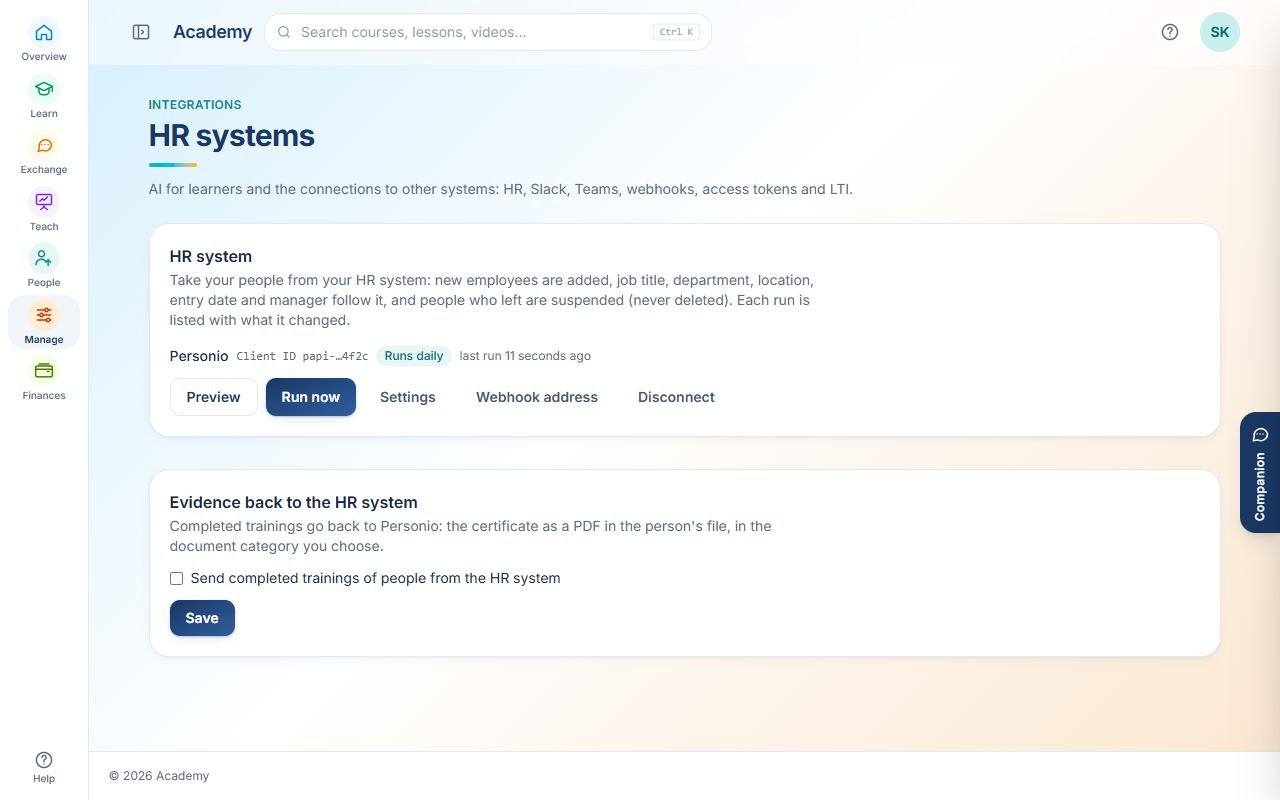
Completed trainings can go back to your HR system, so the personnel file shows them:
- each completed training of a person the HR sync has linked, from the trainings your teams require or offer (see “Mandatory trainings”);
- optionally only required trainings;
- with the certificate as a PDF where the system keeps documents;
- sent about every hour, each training once; failures are tried again and listed with the HR system’s answer.
It works with Personio, Factorial, HiBob, Odoo and Frappe HRMS. The tab shows its settings only when one of them is connected on the Connection tab (see “HR system”); otherwise it says “Nothing to set up here for your organisation.” For other systems, use the webhooks or the n8n node.
What lands where:
| System | What is written |
|---|---|
| Personio | The certificate as a document in the person’s file, in the document category you choose, dated with the completion day, titled with the course and the day; “valid until …” as its comment when the training expires. |
| Factorial | Each course as an external training from the academy, with its product name as provider (created once per course), the person as its member with the completion day; with an author chosen, the certificate in the person’s own documents (not public). |
| HiBob | One entry in the custom table you choose: course, completion date, and optionally valid until and the score in %. |
| Odoo | A line in the employee’s résumé (type Training where the database has one): the course, the completion day, valid until as end date, and the academy’s product name, the score and the certificate link as description; the certificate as an attachment of the employee. |
| Frappe HRMS | A comment on the Employee record (course, completion day, valid until, score, certificate link) and the certificate as a private file attached to it. |
Who does what
Section titled “Who does what”| Step | Where | Role needed |
|---|---|---|
| Switch it on and choose the options | the academy | Administrator of your organisation |
| Personio: document access for the API credentials | Personio, Settings → Integrations → API credentials | A Personio user with API access rights |
| Factorial: nothing more; the API key of the HR connection has access to all company data. For the PDF, a person in Factorial as author | Factorial | Admin access (already given for the key) |
| HiBob: a custom table, and edit access to it for the service user | Bob, the people data settings and the service user’s permission group | A Bob admin |
| Odoo: write access to employees and résumés for the API user; the Skills app (résumé) installed | Odoo, Settings → Manage users → Access Rights | A settings administrator |
| Frappe HRMS: write access to Employee, and the right to add comments | Frappe, the user’s roles | A System Manager |
Step by step
Section titled “Step by step”1. In the HR system
Section titled “1. In the HR system”Personio. The API credentials of the HR connection also need read and write access to documents: the academy lists the document categories and uploads certificates through Personio’s document endpoints (/v1/company/document-categories, /v1/company/documents). Edit the credentials under Settings → Integrations → API credentials. If Personio issues new credentials for this, enter them on the Connection tab under Settings, and confirm a new preview there.
Factorial. For the certificate as PDF, choose a person in Factorial whose email you enter as author: Factorial wants a person as the author of an uploaded document. That person must be an employee in Factorial (the academy looks them up by their email or login email). Without an author, completions are sent without the PDF.
HiBob.
- In Bob, create a custom table for trainings, with columns for at least the course and the completion date, and if you like valid until and the score.
- Give the service user’s permission group Edit on the category the table belongs to (Bob grants table access by category).
- Then the academy lists the table and its columns. Bob’s API docs don’t name the click path for custom tables or the exact permission for writing to one; if writing fails with a permission answer, check the category’s permissions in the group.
Odoo. The API user needs Employees: Officer: Manage all employees (it then may write résumé lines) and the Skills app, which holds the résumé, must be installed. Odoo puts the line under a résumé type whose name contains “train” (for example Training); without one, the line has no type.
Frappe HRMS. The API user needs write access to Employee (HR User or HR Manager) to attach the certificate, and the right to create Comment documents, which Frappe by default gives the System Manager role.
2. In the academy
Section titled “2. In the academy”- Tick Send completed trainings of people from the HR system.
- Include the certificate as PDF: on by default. For Personio it can’t be switched off: Personio keeps certificates only as documents.
- Only required trainings: tick it to leave out trainings a team only offers.
- Per system:
- Personio: choose the Document category in Personio (the list comes from Personio).
- HiBob: choose the Custom table in Bob, then the Column for the course and the Column for the completion date, and if you like the Column for valid until and the Column for the score (%) (or Not used).
- Factorial: the Author of certificates in Factorial (email); empty sends completions without the PDF.
- Odoo and Frappe HRMS: nothing more.
- Click Save. The academy checks with Personio and HiBob that the category, table and columns exist.
Trainings completed from the day you switch it on are sent (Trainings completed since {date}.). Earlier ones are not sent late. Switching it off and on again later starts from the new day.
Evidence goes out only while the HR connection is confirmed and runs daily. After a Save and check on the Connection tab, nothing is sent until a new preview is confirmed; the trainings wait and go out afterwards.
The list
Section titled “The list”Once it is on, the tab shows, below Save, the counts ({n} sent, {n} waiting, {n} failed) and the latest 50 trainings, failed ones first, each with person, course and completion day, its state, and the HR system’s answer if there was an error.
| State | Meaning |
|---|---|
| Waiting | Queued. It goes out with the next hourly pass, at most 25 per pass. With an answer below it, an attempt failed and it is tried again. |
| Sent | Written to the HR system. Each training is sent once; later changes in the academy are not sent again. |
| Failed | Five attempts failed (about 5 minutes, 30 minutes, 2 hours and 12 hours apart). Try again queues it for the next pass. |
A training disappears from the list when it is no longer completed, the person was erased, or the HR sync no longer links them: there is nothing to write.
When something goes wrong
Section titled “When something goes wrong”When saving
- “Some details are missing or not valid. Please check the form.” Personio without a document category; HiBob without the table, or without the columns for the course and the completion date.
- “The chosen place no longer exists in the HR system. Load the list again.” The category, table or a column was removed or renamed in the HR system: reload the page and choose again.
- “The provider didn’t accept this API key. Copy it again from the provider’s settings.” while the categories or tables load: the HR connection’s credentials lack the access for documents (Personio) or custom tables (HiBob).
- “The provider couldn’t be reached or answered with an error. Please try again in a moment. Answer: …” The HR system couldn’t be asked for its categories or tables.
Answers next to a training
These come from the academy or straight from the HR system:
- choose a document category for certificates (Personio) / choose the custom table and its columns for trainings (HiBob): the setting is missing; choose it and save, then Try again.
- Personio keeps certificates as documents: switch on the PDF: there was no PDF to send, for example because the certificate is no longer available.
- the author of certificates is not an employee in Factorial: the author’s email isn’t found among Factorial’s employees. Enter the email of an employee there.
- incomplete or inconsistent response; no people were changed: the HR system’s answer lacked what the academy needs (for example Factorial returned no id for the new training, or the person’s id in Odoo isn’t a number).
- … could not be reached: …: the HR system wasn’t reachable; it is tried again by itself.
- Any other text is the HR system’s own answer, such as a missing permission (see “Who does what”) or a deleted employee.
If trainings stay Waiting without an answer, the HR system as a whole couldn’t be reached at that pass, for example a self-hosted Odoo or Frappe whose address is no longer reachable from the internet. Check the HR connection: Preview on the Connection tab shows whether the academy still reaches the system.