Security & log
Where: Menu → Manage → Security & log
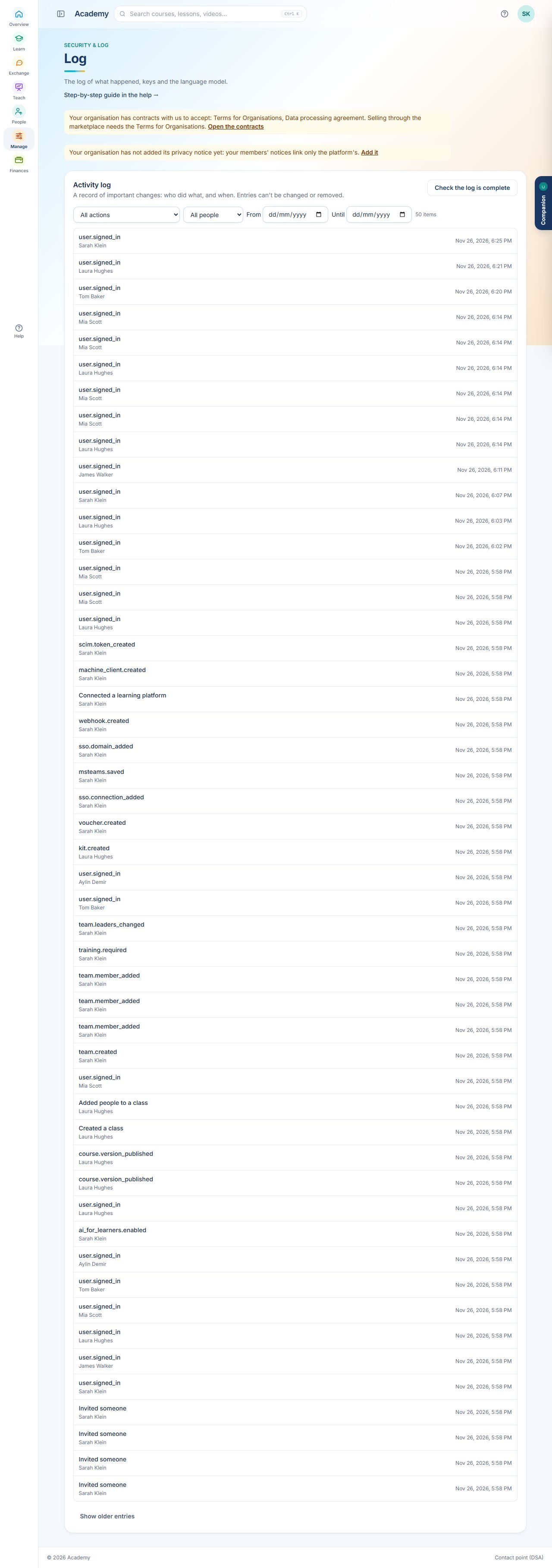
The page has two parts in the menu: Log and Keys & model. The activity log shows who changed what and when. Entries can’t be changed or removed. Keys & model has settings most organisations never need to change, on the tabs “Keys” and “Language model”.
Fields and buttons
Section titled “Fields and buttons”- Check the log is complete: Under Log. Checks no entry was changed or removed afterwards.
- Filter row: Above the entries, under Log. Narrow the list by action (“All actions”), by person (“All people”) and by date (“From”, “Until”). The filter covers the entries loaded so far; click “Show older entries” to search further back. “Clear filter” shows all again.
- Entry details: Click an entry. A window shows the person, what they acted through, the affected item, the time, the entry number, the stored details and the entry’s fingerprint in the chain.
- Encryption: On the tab “Keys”. Conversations with the AI assistant and mentoring notes are encrypted with your organisation’s own key. “Create a new key” and “Re-encrypt older data” switch keys.
- Use your own key service: For organisations that must keep their keys themselves. The button “Use your own key service” beside “Re-encrypt older data” opens a window: enter the address and the access token of your key service and click “Use my key service”.
- Destroy all keys: In the folded red part “Destroy all keys” at the bottom of the tab; click it to open it. Only when leaving the Academy: all encrypted content becomes unreadable for good. After typing the phrase you confirm it’s you: with your password and the code from your authenticator app, or with a passkey. It works only in your own signed-in session, never with an access token or an AI agent.
- Encryption keys and their states: The tab “Keys” lists your keys: the current one, Old (still readable) ones (data encrypted with them can still be read, until you re-encrypt it) and Destroyed ones. A key Managed by Academy lies with the platform; with your own key service, its Key service address shows instead.
- Learning model → Update now: On the tab “Language model”. The Academy estimates how well each learner masters each topic. With enough answers, the estimate is fitted to your learners; until then defaults apply. The table shows, per topic, the four values the estimate rests on:
- Knew it already: how likely a learner knows the topic before practising it;
- Learns per try: how likely one exercise makes them master it;
- Lucky guesses: how likely someone who doesn’t know it still answers right;
- Careless mistakes: how likely someone who knows it still answers wrong.
What the entries of the log mean
Section titled “What the entries of the log mean”Each entry names who did what, when, and through what (the web app, an access token, an AI agent). The actions:
| Entry | Means |
|---|---|
| Invited someone / Invited people from a list | An administrator invited one person, or several from a list (Manage → People) |
| Accepted an invitation | Someone joined through an invitation |
| Signed up through the catalog | Someone created an account to book a course of yours |
| Changed someone’s role | Roles of a person changed |
| Changed someone’s name or email | A person’s name or sign-in address changed |
| Changed their password / Reset their password | A person set a new password, or one was reset |
| Connected a sign-in account / Disconnected a sign-in account | A person linked or unlinked a Microsoft, Google or other sign-in |
| Deleted someone’s account | An account was erased |
| Downloaded personal data | Someone’s data was exported (a person’s own export, or a request handled) |
| Renamed the organisation | The organisation’s name changed |
| Created a class / Deleted a class | A class was made or removed |
| Added people to a class / Removed someone from a class | Class membership changed |
| Changed group membership / Removed someone from a group | Membership of a group changed |
| Assigned a course / Withdrew a course assignment | A course was given to people, or taken back |
| Registered for a course | Someone enrolled themselves |
| A course was bought / A purchase was refunded | A paid booking, or its refund |
| Connected Stripe / Disconnected Stripe / Changed payment options | Online payment was set up, removed or changed |
| Downloaded a course package | A course was exported as a package (cmi5) |
| Withdrew a badge | A badge was taken back from someone |
| Changed a course’s live tutor | The live AI tutor of a course was set up or changed |
| Connected a service / Disconnected a service | An integration (AI provider, DeepL, HeyGen, …) was connected or removed |
| Connected a learning platform / Removed a learning platform | An LTI platform was added or removed |
| Created an AI assistant token / Revoked an AI assistant token | An access token for an AI assistant (MCP) was made or revoked |
| Created a new encryption key / Re-encrypted stored data / Destroyed all encryption keys | The key actions of the tab “Keys” |
| Updated the learning model | The learning model was fitted to your learners again |
Further entries (sign-ins, settings, content) are named the same way.